how do I use cyber-dojo?

cyber-dojo's main use-case is described below.
I recommend two iterations. For example, if you have 2 hours, a schedule might be:
  • 5 minutes initial setup - you need to agree an exercise and language+testFramework
  • 30 minutes coding - display the dashboard during this time
  • 25 minutes review - everyone sees what everyone did!
  • 5 minute break
  • 30 minutes coding - everyone chooses what they'd like to practice improving
  • 25 minutes review - how did we all do?

1. creating your new group-exercise

From the home page one person connects their laptop to a projector...
  • click
    we're in a group
  • click
    create a new exercise
  • click your chosen [exercise?]
  • click your choosen [language, tests?]
  • click
    ok
  • your group-exercise ID will be displayed, eg
    3aF65A
  • leave it displayed so the pairs can join...(see step 2)
  • when everyone has joined, click
    ok
    to open an exercise dashboard (see step 4)

2. joining your group-exercise

Each pair now joins the group-exercise. Each pair, from the home page...
  • click
    we're in a group
  • click
    join an exercise
  • type in the cyber-dojo's id, eg,
    3aF65A
  • wait until your animal is displayed (eg panda)
  • click
    ok
  • each pair is now in their own test environment

3. doing your group-exercise

From their test environment everyone programs for 30 minutes
  • write tests, click
    test
    to see if they fail
  • write code, click
    test
    to see if they pass
  • each
    test
    click creates a new traffic-light :
    • red if one or more tests failed
    • amber if the tests could not be run (eg syntax error)
    • green if all the tests passed
  • remember, cyber-dojo is not a personal development environment
  • remember, cyber-dojo is a shared learning environment
  • the aim is not to finish, the aim is to improve
  • when time is up everyone stops

4. reviewing your group-exercise

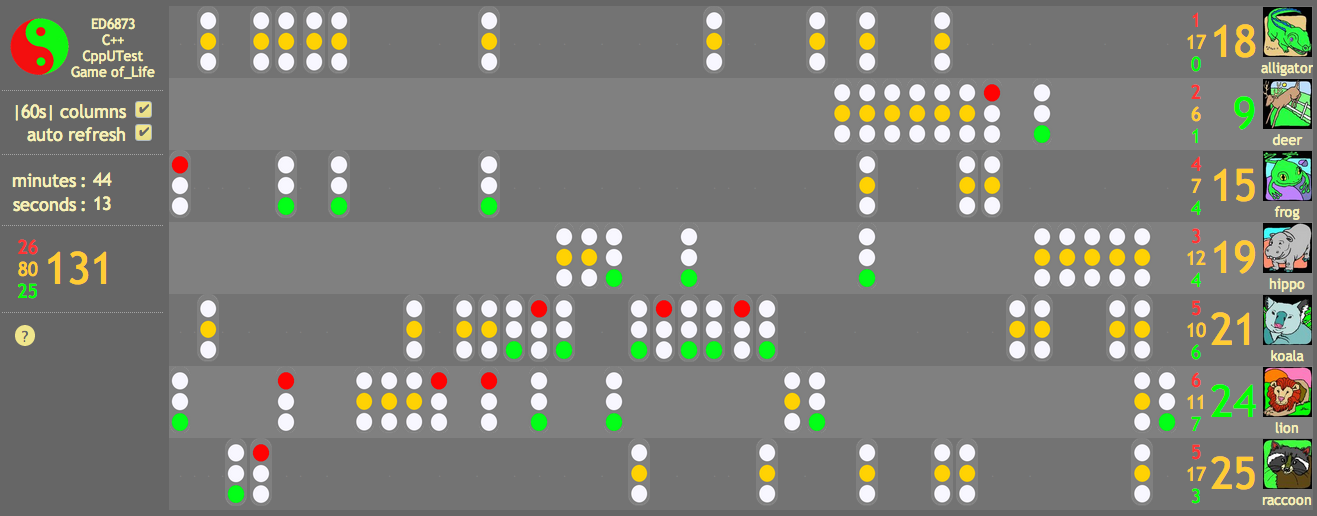
The dashboard (from step 1) displays all the animals and their traffic-lights...
  • encourage everyone to note down anything they see in the review they'd like to try.
  • review each animal's work by clicking on a traffic-light and stepping through their history
  • thank each animal for their work.
  • when the review is done, ask everyone to form new pairs.
  • ask each new pair to compare notes and choose a few things they'd like to try.
  • start the second iteration! Goto 1 and create a new group-exercise.


list of donators

  • Companies.
    Schlumberger Beijing Geoscience Center have found cyber-dojo an invaluable tool for training and development of our software community and believe the project has a bright future. Thank for you contribution to our training efforts. We are delighted to sponsor the cyber-dojo project by contributing $1000.

  • Individuals.
    Olve Maudal, Mike Long, Mathieu Baron, Steve Coates, Johannes van Tonder, Santeri Vesalainen, Alexander Ottesen, Anders Schau Knatten, Mike Sutton, James Grenning, Allan Kelly, Randall White, Lucas Videla, Mark Sargent, Jason Jolly, Mark Grimes, Pedro Gimenez, Marc Kannegiesser, Oliver Baylis, Brian Porter, Jamie Toolin, Alejandro Perez Garcia, Pavol Rovensky, Wojciech Kozlowski, Dan Grassi, Juan Alday, Damian Crawford, Seb Rose, Emily Bache, Michael Coxeter, Fernando Sola Ortiz, Sean Moir, Michael Aderskog, Daniel Aquino, Emyr Williams, Clayton Hunt, Tallapaneni HariBabu, Eric Lefevre, Thomas Rytz, Robert Senkbeil, Charles Armitage, Tobias Froberg, Michael Hilton, David Whittaker, Owen Phelps, Elliot Blackburn, Robert Pitchford, Kevlin Henney, Magnus Lassi, Amitai Schlair.

  • Thank you.

frequently asked questions

Why don't you add auto refactoring?

No. Listen.
Stop trying to go faster; start trying to go slower.
Don't think about finishing; think about improving.
Think about practising as a team.
That's what cyber-dojo is built for.

Why don't you add ...?

No. Listen.
Stop trying to go faster; start trying to go slower.
Don't think about finishing; think about improving.
Think about practising as a team.
That's what cyber-dojo is built for.

cyber-dojo is not an individual development environment
cyber-dojo is a shared practice environment
cyber-dojo is a shared learning environment
cyber-dojo gently provokes; provocation encourages learning

how do I create and share a cyber-dojo customized practice session?

Suppose you want to create your own tailored starting point. For example, you might want to create a practice exercise where the tests are already written. Or some legacy code to practice refactoring.

Without Automation

Prepare your files in a practice session. When you think you have your files how you want them, click the [test] button. If everything is as expected make a note of...
  • the 6 character id (from the URL); suppose it is k5ZTk0
  • the last traffic light's number; in this case 10


Click on the latest (right-most) traffic light. This will switch to review/diff mode. By the big [resume] button there is a smaller [fork] button.


Click the [fork] button. This will open a dialog box asking if you want to create a new group-exercise or a new individual-exercise.


Click the [group] button. This will open the group practice session landing page, displaying its id. In this example rZf7z6 is a new group practice session id which is good for one practice session only.


With Automation

The following HTML will create a submit button which forks from the 10th traffic light of k5ZTk0, creating a brand new group exercise with its own unique id, each time it is clicked:
  <form action="https://cyber-dojo.org/forker/fork_group?id=k5ZTk0&index=10" method="POST">
    <input type="submit" value="Fork a new Group Exercise from id=k5ZTk0 index=10">
  </form>

The following HTML will create a link which forks from the 10th traffic light of k5ZTk0, creating a brand new individual exercise with its own unique id, each time it is clicked:
  <form action="https://cyber-dojo.org/forker/fork_individual?id=k5ZTk0&index=10" method="POST">
    <input type="submit" value="Fork a new Individual Exercise from id=k5ZTk0 index=10">
  </form>

Note that you can also use index=-1 to specify the most recent traffic-light.

analyzing traffic-light transitions

I've written a short ruby script to extract some measurements from a sample of about 500 practice sessions. I looked at transitions between red, amber, and green traffic-lights:
  • red means one or more tests failed
  • amber means the tests did not run (eg syntax error)
  • green means the tests ran and all passed
The first column is average number of lines added/deleted.
The second column is colour → colour transition.
The third column is sample size.

3.94ambergreen447
4.65amberred379
4.67amberamber1462
5.39redgreen607
6.01redred604
7.52greenred420
13.65greenamber436
17.67redamber432
22.18greengreen598

Here's how I interpret the results:
  • If you're at red or green and you make a small change (5.39,6.01,7.52) you're likely to stay at red or green.
  • If you're at red or green and you make a large change (13.65,17.67) you're likely to transition to amber.
  • There is a big spike in the number of amberamber transitions (1462). I speculate that long sequences of these transitions are occuring after a large 13.65 greenamber or 17.67 redamber transition.
  • I think the greengreen value of 22.18 is larger than it should be because it's including renaming a file.


code-retreat at accu2014 conference


I had the wonderful opportunity to facilitate a coderetreat as one of the sessions in the pre-conference tutorial day at the ACCU conference this year.
Coderetreat is a day-long, intensive practice event, focusing on the fundamentals of software development and design. By providing developers the opportunity to take part in focused practice, away from the pressures of 'getting things done', the coderetreat format has proven itself to be a highly effective means of skill improvement. Practicing the basic principles of modular and object-oriented design, developers can improve their ability to write code that minimizes the cost of change over time.
The coderetreat format is pretty simple: solve Conway`s Game of Life, in 45 minute sessions, and throw away what you have at the end of each session. With each session we add additional constraints to challenge ourselves to write code using approaches we wouldn't normally use.


For this coderetreat I used the cyber-dojo software to create an online coding environment for us to practice in. Cyber-dojo is great in this setting because it frees participants from having to spend precious workshop time getting toolchains set up, makes it much easier for us to swap computers, and provides the ability to replay the diffs in the review.

session 1: introducing the game of life

For the first session, there were no constraints other than trying to focus on the Four Rules of Simple Design. This was the first time for many in the group to use cyber-dojo software, and also it was the first time most had tried to implement the Game of Life so there was a lot to take in.
click to view on cyber-dojo.org

Many surprised me with some very far sighted questions, such as "is the universe infinite?", which are rarely asked by first timers.

session 2: ping-pong

For the second session we added the ping-pong constraint. This is where each pair switches keyboard every time a test fails, then the partner must do the minimum to make it pass. Once he (unfortunately there was a lack of gender diversity in this coderetreat!) is happy with the state of the code it is his turn to reciprocate and implement a test for his partner.
click to view on cyber-dojo.org
An interesting point about this session is the "173" written in yellow in this screenshot. This number represents sum total of times we pressed the "Test" button in the cyber-dojo software. In the first session that number was 91, so there was a marked increase in this session.

session 3: promiscuous pairing and immutability

For the third session we added one technical constraint, Immutability, and also changed our pairing strategy to switch partners with other pairs every ten minutes.
click to view on cyber-dojo.org


session 4: changing requirements

In the fourth session we simulated the single most common event in professional programming: changing requirements.
click to view on cyber-dojo.org
Acting as the marketing guy, 15 minutes into the session I announced that the market for Game of Life simulators was in a slump and that we need to target the youth segment with a zombie simulator. And 15 minutes after that, I announced that actually there was some kickback from the press and our simulator had to be configurable for either mode. Many groans were heard in the corridor during this session :-)

session 5: no ifs

The fifth session was a real technical challenge: can you implement Conway's Game of Life without using any if statements?
click to view on cyber-dojo.org
There were a lot more yellow traffic lights, indicating a lot of compilation failures for this session. I think the fact that we were using c++ played a significant part in this because we were dusting off long-forgotten standard library and dynamic dispatch knowledge.

Closing circle and feedback

It is traditional to end a coderetreat with a closing circle. Participants are encouraged to answer three questions:
  1. What, if anything, did you learn?
  2. What, if anything, surprised you today?
  3. What, if anything, will you do differently in the future?
And finally, I asked everyone to write down on paper some feedback: what was the best thing about today, and what would you recommend to improve the next coderetreat? Here are some of the replies:
  • Best thing: Switching pairs and computers. [This opinion was held by many]
  • Best thing: The pacing made it challenging and kept it very live. I wish I could compile and test as fast as cyber-dojo ;-)
  • Best thing: repetition of the basics, approaching the same problem from different points of view, applying different constraints
  • Best thing: coderetreat itself, and switching of pairs. Very interesting
  • Improve: the starting point, so we don't have to perform the same boilerplate changes (renaming files and classes) at the start of every iteration. [Many variations on this one, I think this is also a little language specific, given the amour of boilerplate in c++]
  • Improve: If each session could be a little longer [Also a common theme in the responses]

Meta finale

For many people, coderetreat is their first exposure to pair programming and test-driven development. Cyber-dojo is a great environment to begin learning these new skills because it provides a lot of feedback as you go. Every time you press test you get a snapshot of your code you can look back on, and see the diffs as you progress through the kata. You can also take a look at what other pairs are doing and learn from them.

When looking at how I (and others) approach a problem, there are a few questions I routinely ask. What was the first test? How often did I go through the TDD cycle? How many consecutive greens did I see, indicating a lot of refactoring? Answering these questions is a breeze with cyber-dojo.
All the dojo's from the coderetreat have been uploaded to the cyber-dojo.org server, so feel free to have a peek and look for your own treasure.


You can contact me on twitter @meekrosoft.