the cyber-dojo Foundation

The cyber-dojo Foundation was incorporated as a Scottish Charitable Incorporated Organisation (SCIO) on the 7th August 2015.
It's charity number is SC045890. It's stated charitable objective is
To advance the education of the public in general on the subject of software development.
It's registered trustees are:
  • Jon Jagger. Director of Software at Kosli based in England.
  • Mike Long. Co-founder and CEO at Kosli based in Norway.
  • Olve Maudal. Magician at Equinor based in Norway.
  • Seb Rose. Associate at Cucumber.io based in Scotland.

The cyber-dojo Foundation issues licences for commercial use of the public cyber-dojo server at https://cyber-dojo.org.
If you need a licence please email license@cyber-dojo.org.

@KGISL Coimbatore

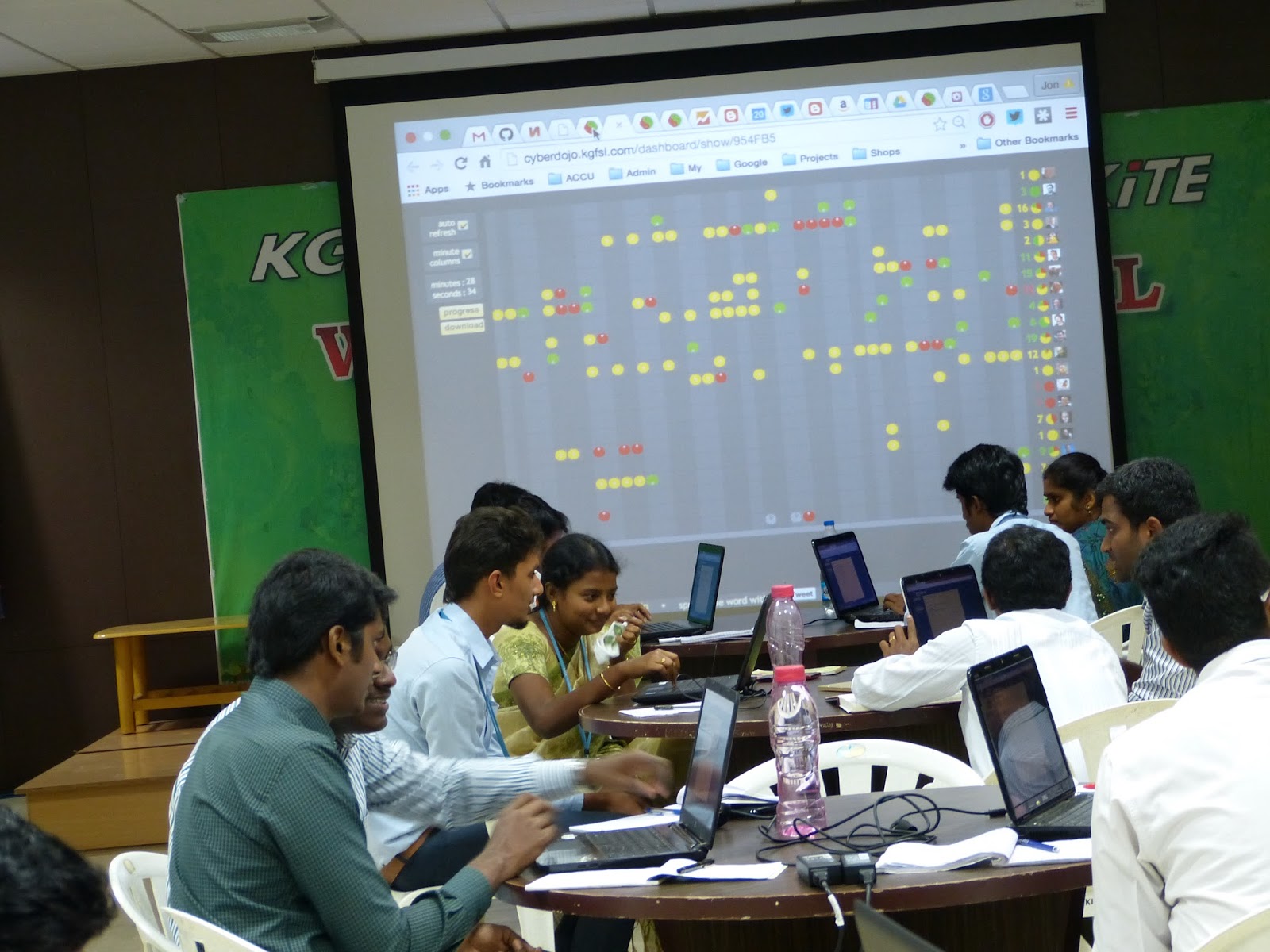
It was an honour and a pleasure to be invited to spend the day at KGISL Institute of Technology in Coimbatore, India. After a presentation on Software Professionalism: How to do deliberate practice (skip to slide 33 if you know how cyber-dojo runs) I helped run a cyber-dojo using a custom server KGISL had built supporting more than sixteen participants - using famous computer scientists as avatars instead of animals. Fantastic! Youngsters from the local community also participated, encouraged by Sudharsan who has been running a local CoderDojo. I was hugely impressed to see Ashok, a founder of KGISL Group roll his sleeves up, literally, and participate in the practice. A terrific example of leadership. Then lunch, and another cyber-dojo, and some more consulting. I look forward to returning. Thank you KGISL.


Atlantec conference

It was a pleasure and an honour to speak at the first Atlantec conference held in Galway, Ireland on May 15th. I talked about cyber-dojo and showed some statistics from a random sample of its 30,000+ cyber-dojos, together with a few examples of code/tests typically submitted, a few dashboard patterns, and wrapped up linking testing to Le Chatelier's Law and some of my favourite Systems Thinking quotes from Bradford Keeney.


do more deliberate practice

Do More Deliberate Practice is one of my entries in 97 Things Every Programmer Should Know.
cyber-dojo.org is the site I built where teams can practice programming.

Deliberate practice is not simply performing a task. If you ask yourself "Why am I performing this task?" and your answer is "To complete the task," then you're not doing deliberate practice.

You do deliberate practice to improve your ability to perform a task. It's about skill and technique. Deliberate practice means repetition. It means performing the task with the aim of increasing your mastery of one or more aspects of the task. It means repeating the repetition. Slowly, over and over again. Until you achieve your desired level of mastery. You do deliberate practice to master the task not to complete the task.

The principal aim of paid development is to finish a product whereas the principal aim of deliberate practice is to improve your performance. They are not the same. Ask yourself, how much of your time do you spend developing someone else's product? How much developing yourself?

How much deliberate practice does it take to acquire expertise?
  • Peter Norvig writes that "It may be that 10,000 hours [...] is the magic number."
  • In Leading Lean Software Development Mary Poppendieck notes that "It takes elite performers a minimum of 10,000 hours of deliberate focused practice to become experts."
The expertise arrives gradually over time — not all at once in the 10,000th hour! Nevertheless, 10,000 hours is a lot: about 20 hours per week for 10 years. Given this level of commitment you might be worrying that you're just not expert material. You are. Greatness is largely a matter of conscious choice. Your choice. Research over the last two decades has shown the main factor in acquiring expertise is time spent doing deliberate practice. Innate ability is not the main factor.
  • Mary: "There is broad consensus among researchers of expert performance that inborn talent does not account for much more than a threshold; you have to have a minimum amount of natural ability to get started in a sport or profession. After that, the people who excel are the ones who work the hardest."
There is little point deliberately practicing something you are already an expert at. Deliberate practice means practicing something you are not good at.
  • Peter: "The key [to developing expertise] is deliberative practice: not just doing it again and again, but challenging yourself with a task that is just beyond your current ability, trying it, analyzing your performance while and after doing it, and correcting any mistakes."
  • Mary: "Deliberate practice does not mean doing what you are good at; it means challenging yourself, doing what you are not good at. So it's not necessarily fun."
Deliberate practice is about learning. About learning that changes you; learning that changes your behavior. Good luck.


setting up your own digital-ocean cyber-dojo server

These instructions are obsolete.

The cyber-dojo server now runs inside a docker-container.
See the new instructions on running your own cyber-dojo web server.


Is a simple 6 step process:

1. start from the right image

From http://cloud.digitalocean.com
  • Image: One-click Apps: [Docker 1.9.1 on 14.04]
  • Size: choose $10/month or more


2. install the cyber-dojo github repo

This will take about a minute. As root (making sure you type cyber-hyphen-dojo and not cyberdojo in the git clone command)...
$ cd /var $ mkdir www $ cd www $ git clone https://github.com/JonJagger/cyber-dojo

3. install cyber-dojo as the default rails server and all the necessary gems

This will take 5+ minutes. As root...
$ cd /var/www/cyber-dojo/admin_scripts $ ./setup_digital_ocean_server.sh


4. install pre-built cyber-dojo-foundation docker-images

As root...
$ cd /var/www/cyber-dojo/languages $ ./docker_list_all_images.rb
will tell you the names of the docker-images held in the cyber-dojo-foundation docker hub
For example:
... cyberdojofoundation/clangpp_googletest == C++ (clang++), GoogleTest cyberdojofoundation/coffeescript_jasmine == CoffeeScript, jasmine cyberdojofoundation/csharp_nunit == C#, NUnit cyberdojofoundation/csharp_specflow == C#, SpecFlow cyberdojofoundation/d_unittest == D, unittest cyberdojofoundation/erlang_eunit == Erlang, eunit cyberdojofoundation/fortran_funit == Fortran, FUnit cyberdojofoundation/fsharp_nunit == F#, NUnit cyberdojofoundation/gcc_assert == C (gcc), assert ...


Now do a
$ docker pull <image>
for each image of your choice. For example,
$ docker pull cyberdojofoundation/clangpp_googletest


Alternatively, you can simply pull them all (typically takes 15+ minutes)
$ cd /var/www/cyber-dojo/languages $ ./docker_pull_all_images.rb


Note that whenever you pull new images you will need to repeat step 5.

5. refresh the caches

As root...
$ cd /var/www/cyber-dojo/caches $ ./refresh_all.sh


6. start your server

As root...
$ service apache2 restart


cyber-dojo at Bristol Docker meetup

Here's a video of a short presentation I did (at the inaugural Bristol Docker meetup) explaining cyber-dojo and how it uses Docker. The projection is mostly invisible I'm afraid. The security flaws (such as running the containers as root) have now been fixed.


the test page


  • click it to run your tests
  • the stdout or stderr file opens and display the results
  • a new right-most traffic-light appears

Click any traffic-light to open the history view
red - the tests ran but one or more failed.
amber - the tests did not run, eg syntax error.
green - the tests ran and all passed.
the tests did not complete in 15 seconds. Accidentally coded an infinite loop? Too many concurrent cyber-dojos? Lost your network connection?
the total number of traffic-lights (in the most recent traffic light's colour).
your animal, if you are in a group practice.

keyboard shortcuts

  • Alt-O toggles through the editor tabs
  • Alt-J cycles downwards through the filenames
  • Alt-K cycles upwards through the filenames
  • Alt-T runs the tests

Here a full list of shorcuts. Some useful ones for seach are replace are:

Start searching == Ctrl-F / Cmd-F
Find next == Ctrl-G / Cmd-G
Find previous == Shift-Ctrl-G / Shift-Cmd-G
Replace == Shift-Ctrl-F / Cmd-Option-F
Replace all == Shift-Ctrl-R / Shift-Cmd-Option-F
Jump to line == Alt-G